Monday, 30 March 2009

Free Magazine Findings

As anyone does I scour the internet for useful and interesting things, information relating to my interests and hobbies one of the biggies. For the people that read magazines (me included) I guess one of the negative points is always going to be the price - it's amazing how much magazine pricing has shot up over the years.

Hope there free PDF magazine resources I've hunted out may be of interest to you folks out there in the net. I'll keep an eye out and update my findings every so often, but for now here's some interest to keep you going.

Creative/Art and Design Magazines

Root


Destructed


Photography


Apple Mac

Smoking Apples Magazine

Mac Companion Magazine

Labels: , , , , , , , , ,

AddThis Social Bookmark Button

Friday, 20 February 2009

I just made my Thunderbird experience better.....and more useful

I have been using Mozilla Thunderbird for some time and found it quite sufficient in what it does never needing to or wanting to take it beyond it's construct.

Recently I started to use a calendar application but discovered Lightning, a Thunderbird add-on bringing the features of Mozilla Sunbird calendar application into the same application as your email.

A couple of other add-on discoveries in ThunderBrowse and the Sender Verification Anti-Phishing Extension installed and behold the new found usefulness, well at least all the usefulness I need for now.

And for one last thing I added some aesthetics in the Azerty 'mail 3.0 theme, and I'm now quite a bit more happy with new look Thunderbird application.

Ho hum, carry on. :)

Labels: , , , , , , ,

AddThis Social Bookmark Button

Sunday, 1 February 2009

Tools For Making Things Easy, Basic Maintenance & Those More Technical Things On osx

Here's something someone mentioned to me, really useful tools and utilities for your mac - the kind of things that keep your machine ship shape, easy to use and dig you out of a hole when everything goes pear shaped - or indeed preventing things from going pear shaped.

The Basic "Must-Have"

Quicksilver - Total ease of use, it's not just an app launcher check out the documention.

Growl - System wide notification, hardware and applications integration.

MainMenu - System maintenance application that sits in your notification area in finder. One click batch task performance or just do what you need to do.


Something Useful

MuCommander - Old style file manager application like Norton Commander with a wealth of features.


System Monitoring

Geektool - Display system logs, Unix commands output, images from your hard drive as well as from the internet.

Basleline - Baseline disk analyser.

Disk Inventory X - Disk usage monitoring tool.


Something More Technical

IceClean - Unix based system maintenance toolset to help keep your mac running smoothly.

Carbon Copy Cloner - Clone syncronise and backup your drives.

Labels: , , , ,

AddThis Social Bookmark Button

Saturday, 27 December 2008

A Happy Christmas For My Mac

Thank you Macheist for giving us these great gifts for Christmas via the Givingtree. A wonderful array of applications and games including Synergy, Enigmo 2 and 1Password amongst others adding up to 8 gifts in all.

Labels: , , , , , , , , ,

AddThis Social Bookmark Button

Friday, 19 December 2008

Microsoft Certification and Windows Vista

A Mac user doing Microsoft qualifications you say? Well, yes and aiming high for a new career - bout time I started this blog up again.

So, if you hadn't guessed, I've been gaining myself some further professional education and it's something new to get my teeth sunk into. In an attempt to aid me (which it did) I invested in a high end box of chips and electronics with Windows Vista on it - I find that with all the hoo har going on about it being no good "XP was better" and "it's just copied from Leopard" well I just like it, maybe because of the new learning maybe because of it being something new.

I has opened up my interest in Freeware and Open Source again on the Windows side of the coin, which to be honest I am quite impressed with the quality of - considering I was totally bowled over with the quality and depth of Mac Freeware and branded Windows alternatives as poor in comparison.

Above all of the system maintenance freeware that i put on here (Vista machine) the one that most impressed me (and this may seem daft) is Launchy for the one sole reason of what it is and does, which is act like Quicksiler on my Mac.

Labels: , , , , , ,

AddThis Social Bookmark Button

Wednesday, 30 January 2008

Freeware OSX Applications For Accounting

Save money and try these of instead of the likes of Quickbooks.

Balance

Track your finances, whether it be stock investments or a credit card transaction. Then chart them according to the categories you define.

Buddi

Buddi is a personal finance and budgeting program, aimed at those who have little or no financial background.

Burn

Catalogue the cost of life. With Burn, you can track the cost of your road trip, figure out your weekly coffee bill, and ensure you don't exceed your monthly budget.

CashBox

Cashbox is a personal finance applicaiton for Mac OS X.

iCompta

iCompta is an application that lets you manage your personal accounts with ease.

Luca

Luca is a full-featured, fully-functional, accrual-based accounting system that runs on OS X. It has the ability to handle real-time double-entry postings and multiple currencies...

Mini Money

A miniature sized money manager that features simplicity and power in a small package.

SpendThrift

A personal-finance manager focused on speed and ease of use. There’s no setup, no maintenance, no tediousness, no cause to fall out of the habit of using it, and no waking up to find a huge discrepancy with one’s checking account.

Powered by ScribeFire.

Labels: , , , ,

AddThis Social Bookmark Button

Friday, 5 October 2007

My Recommended Resources For Freeware On Your Mac

To all you mac users out there I (as a mac user myself), though I'd post for you a few great sites for getting your hands on the best freeware and opensource software - the best resources I have come across all in one post, so here you go.

The Best Sites for OSX Freeware and OpenSource

Cool OSX Apps - One of (if not THE) best mac blogs for freeware and shareware along with some commercial stuff now and again

FreeMacWare - Another great source for all things free software, also has other good sections to the site like FreeMacPhoto

I Use This - A comprehensive software listing of what's new in all areas of software - site depends on entries from users also, create an account add apps that aren't there and keep track of all the apps you use on your mac.

Best Mac Software - A good selection of the essential software you would want for your mac - freeware and opensource of course

The Free Mac Classroom - An extensive list of freeware and opensource software for your mac, aimed at (as the title suggests) students who need software on the cheap, it is also a greatly valuable source for all the rest of us mac users too as it lists software most would not think available. The list isn't exhaustive at all, so if you know of some freeware that could be usefull in the workplace, classroom or other you can let the author know of them so they can be made available to other users.

Also worthy of a mention are;

Mohawke's Best Of The Best - another comprehensive site with not only mac freeware and opensoure but a windows list too along with a couple others, worth checking out - some software may be obsolete or changed name but this is a good resource.

Downloadpedia specifically sections Best Mac Software and Open Source Mac. This also has Linux and Windows section along with Firefox and Thhunderbird add-on sections.

Other Resources - These are mixed resources, mac, windows and online

Open Source God | Mashable - 480+ Opensource applications and resources.

Free and Open Source Software Directory - Webi - Categorized opensource software applications and games.

45 Best Freeware Design Programs

Well, there you go, enjoy!


Powered by ScribeFire.

Labels: , , , ,

AddThis Social Bookmark Button

Tuesday, 5 June 2007

3 Totally Differenet But Possibly Usefull Freeware Apps

POS/OE 4

POS/OE 4 is powerful business software offering features for performing point of sale/retail, mail-telephone order (MOTO), wholesale, distribution, ecommerce, inventory control, light manufacturing, accounting, credit card processing, and much more. It supports single user, multi-user, and multi-location systems.


Jobs

Jobs is an application to track your orders and jobs. Jobs can be synced with iCal and you can backup your data on .Mac. You can create notes for each client and you can allocate jobs to different projects. Jobs needs Mac OS X 10.4.8, for Sync you need iCal 2.0.4 and for backing up on an iDisk you need a valid .Mac Account. Thanks to A. Dodson.


Jer's Novel Writer

Jer's Novel Writer is a relatively simple word processor with extra features to support large creative writing projects.

I wrote this program to fit the way I write. More specifically, I wrote it to help overcome my shortcomings. It would be terribly presumptuous to think that anyone else out there faces the same obstacles I do when I write, but it would also be presumptuous to think that I was the only one in the world with these problems. So I offer what I created to make me a better writer, hoping that it will help others too.


Labels: , ,

AddThis Social Bookmark Button

Thursday, 31 May 2007

Retro Gaming - Nothing I like More

Retrospec

Found this a while back, retro game conversions for pc and mac - things like


Exolon

and..


Head Over Heels

those two are awesome, and as hard as ever have it fom me :) there is a lot more for you pc guys than for mac but i think they are working on some more.

Labels: , , ,

AddThis Social Bookmark Button

Store Those Passwords And Log-ins

I think we al have too many passwords and log-ins to remember them all, we all forget right?
Come across KeyManager just now, by Cafeinasoft, and thought it was about time i used one of these applications to track my psswords - so why not this one.

KeyManager has password encryption, type manager and live search.

Create diferent types
Live Search field to fast search in KeyManager database
Backup function
Main Password to keep your data protected
Simple and intuitive interface
KeyManager interface is easy to learn and use.

Labels: , , ,

AddThis Social Bookmark Button

Wednesday, 30 May 2007

I'll Get Straight Into It Then...

Starting off the freeware theme then, I just opened up Cool Osx Apps to find Time-Tracker. It's, well you guessed it, an application for time management on projects and i'm assuming it can come in handy in the office, at home  and possibly most handy if you're a freelance designer type.

Time-Tracker is a mac osx application which is under the Google website there - other information on the application is available on links to i use this and versiontracker.

Labels: , ,

AddThis Social Bookmark Button

Sunday, 18 March 2007

digging around

I was digging around the other day serching freeware and open-souce stuff, i was looking for something inparticular in a cd collection lbrary application but failing to do so. I did however find a few applications that were a suprise quite frankly and thought that they may be of use to some people.

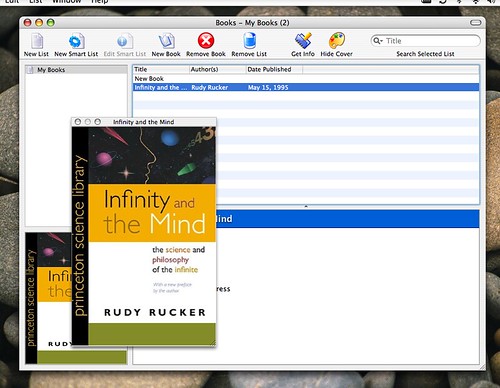
First off in the open-source bin we have Books which is book cataloging application to keep track of your library (requires OSX 10.4).

Secondly we have Cashbox a personal finance management application (requires OSX 10.4).

This one might prove a little tricky, i'm not sure but the instructions seem pretty straightforward and Home Media Librarian is a java application that uses MySQL database. It does what is says on the tin, catalogue your cd's, dvd's, records or music collection.

Now two freeware apps - eBook Library is an application developed to help you practice speed reading.

Luca is a fully featured and fully functional accounting application - snap it up, awesome freeware (requires OSX 10.4 Tiger)

Labels: , ,

AddThis Social Bookmark Button

Wednesday, 14 March 2007

IceClean

posted on Mac Beginners

Ok, 10.4.9 system update is out - if you didn't know check your "software update" now, as recommended on osxhints you should restart twice and do a permisions repair after the update and this should make all well. The first reboot may take a few minutes longer than usual, just thought i'd make you aware.

Now to the point of my post, now that you have updated to 10.4.9 your copy of MainMenu 1.7 wil not work and you will have to wait until 1.8 is released - "so, how do i repair my permissions then?" i hear you ask, well there is of course Disk Utility in the "Utilities" folder amongst your applications but - and here the main point of the post - i had seen stuff on this freeware application called IceClean.

IceClean is a system optimization and maintenance tool which utilises the built in unix system tasks to help keep your mac perky

Labels: , , ,

AddThis Social Bookmark Button

Friday, 2 March 2007

security on mac

posted on Mac Beginners

Security and peace of mind on a mac may be simpler and somewhat less of an issue than what you had when using a windows machine, especialy when it comes to the virus perspective. That said however, for any computer connected to the internet a firewall is something that you need to keep from intrusion onto your computer or indeed your network in a business environment. Now for the average home user turning on your inbuilt OSX firewall in system preferences should suffice - you will find firewall options under “Sharing” - or if you are someone like me who never trusted the inbuilt windows xp firefall to start with or in fact you need something a little more in your firewall software as you need it for a network then there are some software you can look into.

First off we have a freeware application called WaterRoof which is a frontend for the Mac OS X firewall and will help you configure extra options and monitors with setup wizards and an easy interface. Second up is the commercial software DoorStop X Firewall which again claims to add extension to the built in OSX firewall control, and on the main page you will find another piece of software a book and most interestingly a link to their blog on security which may be worth a look.

Now on the business/networking side of things is Intego NetBarrier with firewall, anti-vandal tools, privacy protection, data filter and monitoring tools you can secure your computer/network and keep a close eye on what’s going on.

Antivirus protection isn’t really neccessary we are told but in the light of recent shenanigans and possible future developments i can’t help but feel viruses are on the way to OSX, so just in case get your hands on a copy of ClamXav to make your online and network usage totally secure for your mac.

Labels: , , , ,

AddThis Social Bookmark Button

Thursday, 1 March 2007

photography, flickr and osx

posted on Mac Beginners

So, i recently discovered flickr and started my hobbiest photography going around places for walks wth my camera taking shots - nothing specific in the way i go about my photograhs, anyway for thos of you that are also into photography on your mac a few things to help out with your photos and flickr.

First off, there is PhotoInfoEditor which enables you to edit the meta data of your photos, adding location details as in City, Area, Country, Lattitude, Longitude, Altitude with the assistance of google map and you can add descriptions and comments to each file also.

Now for those of you that are into creating panoramas and looking for good solid software to create and stitch together your panoramas - look no further than Hugin - Panorama Tools GUI, and yes it’s free! If you happen to download and use would someone be so kind as to teach me how to use it

I have also discovered some neat apps that work with your fickr account tickr for flickr and Sniper. Tickr - as the name suggests - is a ticker-tape effect of scrolling phtos across or down your desktop, you search using keyword box and the results are scrolled through of which if you move the curor over a photo the stream stops and shows information about that photo. Sniper on the other hand is basically a replacement for the flickr interface in the style of an iPhoto like image viewer application and has some nifty features to sort, view and upload photos as well as access your account details all within the application window.

One of my personal favourite freeware applications for things photographs and flickr is JetPhoto Studio which lets you creat backup web album of your photos with descriptions and notes, edit exif meta-data, works with google earth for GPS tracking of your photos and also the ability to output photos to a flash gallery along with a few other features bundled in.

Labels: , , , ,

AddThis Social Bookmark Button

a few things to help your mac-life along

posted on Mac Beginners

Admitedly a few of these apps may be for the more advanced user, but they are pretty straightforward and easy to learn if it’s the type of thing you think you need. Much like your old windows box maintenance is the key - although not as often and not as intense, i have already mentioned AppDelete - an application that will delete the application you choose and any associated items (files and folders) that belong to that application - and Main Menu - an application that sits in your menubar and makes running maintenance scripts a one click easy job but i think it is worth mentioning a few other things to help with the mac-housework.

First off, something that comes in usefull every now and again to clean out my browser caches, history, searches etc is a little application called AfterSurf - basically quit your browsers, tick a few boxes and hit “clean” and job done - relieve that sluggish browser affect and check out AfterSurf.

Now this one may seem a little advanced but it is worth mentioning as a lot of people seem to use this - it’s called AppleJack and its troubleshooting assistant and maintenance application that runs from the command line, if you like, in a menu base system. I don’t personally use this but people do tend to find this a handy tool so it’s worth checking out to see if it’s for you.

A little tip to win back some space from osx on your brand spanking new machine is to remove the extra language support files that osx installs - like for instance, i’m british and personally only need the british and american english language files all the rest like africaans, basque, etc are just laking up space. To help you do this there is an application called Monolingual just tick the boxes to the languages you DON’T require and hit “remove” and job done - takes a while for the files to be extracted and deleted, and remember to be carefull to ONLY remove the languages that are not required or it’s to the install disks for you and i don’t want to be the cause of that.

Punakea File management - “Punakea is a little app trying to help you cope with the day-to-day struggle of managing your files. Designed to complement Spotlight, it allows you to tag your files and bookmarks, freeing you of the strict hierarchy of the Finder’s folder structure.”

Set your default applications to open certain file types and file extensions with RCDefaultApp and you’ll never end up opening up your heavy duty image applications when all you want to do is view a jpeg in preview.

In the menu under the open application name there is a submenu called “Services” and with ServiceScrubber you can trim it down to only the services you use like the screen grab service - for instance i also use thesaurus, translation service, omni dictionary and they go into the service menu for use within applications - check it out if you haven’t discovered the service menu yet and make it work to your needs.

Labels: , , ,

AddThis Social Bookmark Button

a recommended software starter pack for switchers

posted on Mac Beginners

someone suggested the idea of recommending a sort of “starter pack” of freeware apps that are going to set you on your way with Mac OSX, ok then a great idea lets see.


AppDelete

iBackup

MainMenu

Butler or Quicksilver

Adium

Thunderbird

OpenOffice or NeoOffice

LiquidCD

All your basic needs covered there i think.

Labels: , , ,

AddThis Social Bookmark Button

a thought - what applications do i need, and where do i get them…

posted on Mac Beginners

If that is your train of thought, then i maty be able to help. The best thing i have found about Mac OSX is the freeware available for it - freeware that is of such great quality and diversity, you can get a piece of software for almost anything you can imagine you need for the mac and then some you would never think of. Ok lets start with the all important nitty gritty of replacements for microsoft office, as i don’t imagine you’ll be going out to purchase that straight away - or at all, try OpenOffice or NeoOffice for full ooffice suite replacement but if you are like me and just needed Word every now and again try AbiWord for your document needs, as it can open and save to .doc file extension. Another thing i feel i need to tell you is about system productivity and maintenance applications, first off you may hear of have heard about Quicksilver or Butler or maybe not - check them out they will make your use of OSX much quicker, easier and refreshing - my personal pick is butler, but why not try them both out and compare as there are a few others out there similar to these two. Secondly, maintenance - keep your mac upto scratch and in perfect running order, this is not the ordeal you had to go through to try to keep windows running smoothly, check out and install MainMenu - a simple one click autoomated maintenance application that sits in your menu bar. Other notable apps you will need are the likes of Adium for all your IM communication needs on AIM, MSN and Yahoo, with plenty more things to discover in freeware software i won’t spoil the experience for you of discovering cool OSX software, gadgets and tools i suggest you keep an eye on sites like Cool OSX Apps, FreeMacWare.com, Super OSX Menubar Items, iusethis and then you also have Versiontracker

As an example of what is available in freeware and which apps are most usefull that your mac cannot do without, my list is as follows - that is the list of freeware that is actually on my machine and which i use constantly.

IM Chat - Adium X, CD Media - LiquidCD, Email - Thunderbird, System-wide Productivity - Butler, Maintenance - MainMenu, Time and Date - JetClock, FTP - CyberDuck, Photo Gallery and Flickr - JetPhotoStudio, Screen Capture - SnapNDrag, Font Management - Linotype Font Explorer X, Disc Image Mounting - FlashMount

And i do have a few notable others on my machine, it is of great interest to me to see what is out there and test out anything that i may find usefull.

Labels: , , ,

AddThis Social Bookmark Button

It's ME!

A Collection Of Thoughts On Anything From Apple Mac And Freeware To Fonts And Photography

Struggling IT Professional, Mac User and Photographer.

View Ian Marshall's profile on LinkedIn

Powered by Blogger

Add to Technorati Favorites

 Subscribe in a reader

web design directory web design directory

Spreadfirefox Affiliate Button

www.spreadthunderbird.com

www.flickr.com
This is a Flickr badge showing items in a set called Personal Bests. Make your own badge here.