Monday, 30 March 2009

Simple CD Collection Cataloguing With InCDius

InCDius is a searchable and scriptable Audio CD cataloguing application. InCDius works with freedb so once you insert a CD it will retrieve all the information for you automatically.

First of all to set things up is choose a freedb server near you, this is done via the preferences of the application like the screenshot below.


screenshot of lookup tab

When you have set that up and insert your first CD, the import pane will pop up and you will see the connection to server and retrieval of CD information displayed as below.


screenshot of imported CD information

On this pane you have the two other tabs to input extra information, like your rating of the album an your specific genre for the album.

Once you have imported your collection, you can view all the imported data via the CD Browser window and scroll through your entire library.


screenshot of CD Browser

There is also a CD Controller window which lets you play the Cd's without having to open iTunes so you can review the tunes and refresh your memory.


Labels: , , , , , , ,

AddThis Social Bookmark Button

Monday, 2 March 2009

Opensource Alternative For Creatives

In the current climate what better way to save money to make money than to employ open source free software as your creative tools.

Your alternative are as follows

For web design > NVU, a simple straightforward WYSIWYG editor for you web needs.

For animation > Synfig, 2D time-line animation creation tool.

For vector graphics creation > Inkscape, a vector graphics application similar to Illustrator and CorelDraw.

For page layout > Scribus, open source professional page layout design application.

For multimedia design > Libavg, create media rich interactive presentations akin to Director.

For video editing > Avidmux, video editor designed for simple cutting, filtering and encoding supporting many file types.

For adding video effects > Jahshaka, edit and add visual effects like After Effects.


Labels: , , , , , , , , ,

AddThis Social Bookmark Button

Friday, 20 February 2009

I just made my Thunderbird experience better.....and more useful

I have been using Mozilla Thunderbird for some time and found it quite sufficient in what it does never needing to or wanting to take it beyond it's construct.

Recently I started to use a calendar application but discovered Lightning, a Thunderbird add-on bringing the features of Mozilla Sunbird calendar application into the same application as your email.

A couple of other add-on discoveries in ThunderBrowse and the Sender Verification Anti-Phishing Extension installed and behold the new found usefulness, well at least all the usefulness I need for now.

And for one last thing I added some aesthetics in the Azerty 'mail 3.0 theme, and I'm now quite a bit more happy with new look Thunderbird application.

Ho hum, carry on. :)

Labels: , , , , , , ,

AddThis Social Bookmark Button

Sunday, 1 February 2009

Tools For Making Things Easy, Basic Maintenance & Those More Technical Things On osx

Here's something someone mentioned to me, really useful tools and utilities for your mac - the kind of things that keep your machine ship shape, easy to use and dig you out of a hole when everything goes pear shaped - or indeed preventing things from going pear shaped.

The Basic "Must-Have"

Quicksilver - Total ease of use, it's not just an app launcher check out the documention.

Growl - System wide notification, hardware and applications integration.

MainMenu - System maintenance application that sits in your notification area in finder. One click batch task performance or just do what you need to do.


Something Useful

MuCommander - Old style file manager application like Norton Commander with a wealth of features.


System Monitoring

Geektool - Display system logs, Unix commands output, images from your hard drive as well as from the internet.

Basleline - Baseline disk analyser.

Disk Inventory X - Disk usage monitoring tool.


Something More Technical

IceClean - Unix based system maintenance toolset to help keep your mac running smoothly.

Carbon Copy Cloner - Clone syncronise and backup your drives.

Labels: , , , ,

AddThis Social Bookmark Button

Saturday, 27 December 2008

A Happy Christmas For My Mac

Thank you Macheist for giving us these great gifts for Christmas via the Givingtree. A wonderful array of applications and games including Synergy, Enigmo 2 and 1Password amongst others adding up to 8 gifts in all.

Labels: , , , , , , , , ,

AddThis Social Bookmark Button

Tuesday, 5 February 2008

New Month, New Ambition Flurishes

So here we are in February then, and welcome pack ordered from Microsoft coming in a few weeks. Next exam booked for the 13th, so i'm cramming to get a good pass mark for gaining my MCDST qualification and also signed on board for the Vista Client course coming up to further extend my horizons and interest in IT as a career.

Don't want to look too far ahead at the moment, but I am quite interested in the Server Administration that the Vista course points to - hope I can work my way there with these qualifications I'm gaining. It's a million miles away from a career in design that I had wanted (at least though I did), but never the less interesting and I'm quite enthusiastic about getting back into work in a new arena of the IT industry.

A related topic which also got me interested in wanting to have a play was this little app for mac osx 10.4 called Sandbox. Which brings to 10.4 the possible use of ACL or Access Control Lists that are not un-akin to the NTFS and/or share permissions of Windows XP - usually only available in OSX Server. I would like to get to grips with Mac Support and Administration at some point, so this might be worth a look into.


Powered by ScribeFire.

Labels: , , , ,

AddThis Social Bookmark Button

Wednesday, 30 January 2008

Freeware OSX Applications For Accounting

Save money and try these of instead of the likes of Quickbooks.

Balance

Track your finances, whether it be stock investments or a credit card transaction. Then chart them according to the categories you define.

Buddi

Buddi is a personal finance and budgeting program, aimed at those who have little or no financial background.

Burn

Catalogue the cost of life. With Burn, you can track the cost of your road trip, figure out your weekly coffee bill, and ensure you don't exceed your monthly budget.

CashBox

Cashbox is a personal finance applicaiton for Mac OS X.

iCompta

iCompta is an application that lets you manage your personal accounts with ease.

Luca

Luca is a full-featured, fully-functional, accrual-based accounting system that runs on OS X. It has the ability to handle real-time double-entry postings and multiple currencies...

Mini Money

A miniature sized money manager that features simplicity and power in a small package.

SpendThrift

A personal-finance manager focused on speed and ease of use. There’s no setup, no maintenance, no tediousness, no cause to fall out of the habit of using it, and no waking up to find a huge discrepancy with one’s checking account.

Powered by ScribeFire.

Labels: , , , ,

AddThis Social Bookmark Button

Thursday, 6 December 2007

Recommended OSX Freeware List (Continued)

Games

SuperTux

go back to the classic 2D scrolling platform adventures with this addictive game.

Freeciv

A port of the classic Civilization game.

Battle For Wesnoth

An epic RPG, very extensive with add-on scenarios and ability to create your own.

Head Over Heels

A classic from way back, now reborn on the Mac.

Blackjack International

Great casino card game - pit your wits against the the dealer and four other AI players.

Otis

Addictive puzzle game.

Quinn

Tetris on your Mac.

Dinky Dungeon

Adventure RPG game.

Transport Tycoon

The classic game brought to osx.

Open Arena

Game based on Quake 3 engine.

JSokoban

The classic Mac puzzle game.

Quackle

Play scrabble against AI opponent.

GeoParty

Trivia game in the style of Double Jeopardy

Spell-O-Gram

something for the kids - help them with their spelling.

JewelToy

An interesting and enjoyable puzzle game.


Obviously there are a load more I could have listed, these are just the ones I have been interested in enough to download and play.

Labels: , ,

AddThis Social Bookmark Button

Sunday, 25 November 2007

Recommended OSX Freeware List (Continued)

CD/DVD burning

LiquidCD - LiquidCD is a freeware for burning CDs and DVDs built for Mac OS X. But LiquidCD is more than a burning software and has useful built-in features.

SimplyBurns - simple and straightforward burning.


addition to Communication

Psi - Psi is a free instant messaging application designed for the Jabber IM network (including Google Talk).


additional Network Tools

CoconutWiFi - WiFi network detection.

OSXvnc - Freeware VNC server.

Chicken Of The VNC - VNC Client.


Text Editors

Textwrangler - General purpose, powerful text editor.


Screen Capture

InstantShot - Sits in your menu bar adding extra screen capture features than the inbuilt ones.

SnapnDrag - Screen capture made easy.


additional Miscellaneous Utilities

UnRarX - Simple RAR extraction utility.

Labels: ,

AddThis Social Bookmark Button

Friday, 23 November 2007

Recommended OSX Freeware List

App Launcher/Keyboard Interface

Quicksilver - An extensive tools that integrates into your system, from it's simplest level of an application launcher, using the keyboard interface Quicksilver can be so much more.


Back-Up Utilities

SuperDuper - Back up and clone your drives with this great tool

iBackup - A simple backup and restore utility, supports scheduled backups of files, folders and applications.


Browsers

Firefox - A top browser, now going into version 3 which is reportedly faster and a better performer all round - my personal browser of choice.

Opera - A most worthy browser that is to a lot of peoples liking, and have to admit i like most of it's features too.


Communication

Adium - The best multi account instant messenger including jabber and gtalk amongst the regulars along with many more.


FTP

Cyberduck - The best and easiest in use of ftp clients for osx.


Maintenance

AppDelete - Saves you going around deleting everything manually.

IceClean - A powerful general maintenance application bringing you the power of UNIX - akin to the likes of TechTool, a worthy addition to your arsenal it WILL come in handy.

MainMenu - Handy menu bar maintenance app to save you the time and effort.


MS Office Alternative

NeoOffice and OpenOffice - Essentially the same suite, this is your chance to say goodbye to MS Office and save yourself the money and hassle - NeoOffice is a little better at the moment as OpenOffice is just becoming OSX native.


Network Tools

Bwanadik - I only recently discovered this one, menubar app creating a shortcut to most of your network preferences, most notably displays your connections and external/local IP addresses.

iStumbler - Wireless discovery app, find those wi-fi hotspots, bluetooth devices and bonjour services.


Photography

JetPhoto Studio - This is one awesome app, photo library, image correction, flickr uploader and photo web gallery creater all in one - option to upgrade to Pro version.


RSS Readers

Vienna - RSS reader with some nice features, including growl integration, menubar icon, tabbed viewing of articles/subscriptions along with a few others.


Miscellaneous Utilities

Calq - On demand calculator, activate with keypress do your calculation and then it hides until needed again.

Desktop Manager - If you have machines that are not compatible with Leopard and you want virtual desktops, then look no further, the site says it is alpha quality but it works perfectly well and I use it on 10.4.11 - still going strong here :)

Growl - System notifications preference pane add on, plugs into an array of applications and system areas letting you know what is happening - including firefox, quicksilver, adium, mainmenu and vienna.

MagiCal - Handy menubar calendar and clock app.

Password Gorilla - Registrations and logins manager.

PTHPasteboard - Useful Utility that keeps a record of your pasteboard handy.

Labels: ,

AddThis Social Bookmark Button

Friday, 5 October 2007

My Recommended Resources For Freeware On Your Mac

To all you mac users out there I (as a mac user myself), though I'd post for you a few great sites for getting your hands on the best freeware and opensource software - the best resources I have come across all in one post, so here you go.

The Best Sites for OSX Freeware and OpenSource

Cool OSX Apps - One of (if not THE) best mac blogs for freeware and shareware along with some commercial stuff now and again

FreeMacWare - Another great source for all things free software, also has other good sections to the site like FreeMacPhoto

I Use This - A comprehensive software listing of what's new in all areas of software - site depends on entries from users also, create an account add apps that aren't there and keep track of all the apps you use on your mac.

Best Mac Software - A good selection of the essential software you would want for your mac - freeware and opensource of course

The Free Mac Classroom - An extensive list of freeware and opensource software for your mac, aimed at (as the title suggests) students who need software on the cheap, it is also a greatly valuable source for all the rest of us mac users too as it lists software most would not think available. The list isn't exhaustive at all, so if you know of some freeware that could be usefull in the workplace, classroom or other you can let the author know of them so they can be made available to other users.

Also worthy of a mention are;

Mohawke's Best Of The Best - another comprehensive site with not only mac freeware and opensoure but a windows list too along with a couple others, worth checking out - some software may be obsolete or changed name but this is a good resource.

Downloadpedia specifically sections Best Mac Software and Open Source Mac. This also has Linux and Windows section along with Firefox and Thhunderbird add-on sections.

Other Resources - These are mixed resources, mac, windows and online

Open Source God | Mashable - 480+ Opensource applications and resources.

Free and Open Source Software Directory - Webi - Categorized opensource software applications and games.

45 Best Freeware Design Programs

Well, there you go, enjoy!


Powered by ScribeFire.

Labels: , , , ,

AddThis Social Bookmark Button

Thursday, 28 June 2007

Flow - Private Beta

Workflow Management app for osx offers an early look into it's features

Flow isn't like the rest. We've taken the time to understand how people want to work. We've taken the time to take those paradigms, and apply them in an intuitive and natural user-interface. We've looked at what makes great software great, and we've used those methodologies in ways like never before. We've gone the extra mile, and added support for nearly every remote-protocol you could posibly want. But we know more than what to add — we also know what to leave out. Flow doesn't get in your way — in fact, when Flow was just a drawing on a whiteboard, the first words written were "streamlined workflow." That's why we call it Flow.


Flow Screenshot

Head over to Flow website to sign up for the beta test

Powered by ScribeFire.

Labels: , , , , ,

AddThis Social Bookmark Button

Thursday, 7 June 2007

Pixelmator

"Pixelmator, the beautifully designed, easy-to-use, fast and powerful image editor for Mac OS X has everything you need to create, edit and enhance your images."

This really looks awesome - we have photoshop I know, but pixelmator looks to integrate into the osx ystem and add to the mac experience utilising automator, iphoto, isight and .mac for some features.

Take a look over at www.pixelmator.com

----------------------

Further information in their forums state it will cost $59 and there will be a Beta coming near the end of July.

Sign up to the newsletter to keep up to date with Pixelmator progress.

Labels: , , ,

AddThis Social Bookmark Button

Tuesday, 5 June 2007

3 Totally Differenet But Possibly Usefull Freeware Apps

POS/OE 4

POS/OE 4 is powerful business software offering features for performing point of sale/retail, mail-telephone order (MOTO), wholesale, distribution, ecommerce, inventory control, light manufacturing, accounting, credit card processing, and much more. It supports single user, multi-user, and multi-location systems.


Jobs

Jobs is an application to track your orders and jobs. Jobs can be synced with iCal and you can backup your data on .Mac. You can create notes for each client and you can allocate jobs to different projects. Jobs needs Mac OS X 10.4.8, for Sync you need iCal 2.0.4 and for backing up on an iDisk you need a valid .Mac Account. Thanks to A. Dodson.


Jer's Novel Writer

Jer's Novel Writer is a relatively simple word processor with extra features to support large creative writing projects.

I wrote this program to fit the way I write. More specifically, I wrote it to help overcome my shortcomings. It would be terribly presumptuous to think that anyone else out there faces the same obstacles I do when I write, but it would also be presumptuous to think that I was the only one in the world with these problems. So I offer what I created to make me a better writer, hoping that it will help others too.


Labels: , ,

AddThis Social Bookmark Button

Sunday, 3 June 2007

Keep Track Of Your Updates

Install AppFresh on your osx 10.4 mac to keep an eye on all your application updates.

From the site:

AppFresh helps you to keep all applications (third-party and Apple), widgets, preference panes and application plugins on your Mac up to date, from one place. It works by checking the excellent iusethis.com for new versions and lets you download and install available updates easily.


Labels: ,

AddThis Social Bookmark Button

Thursday, 31 May 2007

Store Those Passwords And Log-ins

I think we al have too many passwords and log-ins to remember them all, we all forget right?
Come across KeyManager just now, by Cafeinasoft, and thought it was about time i used one of these applications to track my psswords - so why not this one.

KeyManager has password encryption, type manager and live search.

Create diferent types
Live Search field to fast search in KeyManager database
Backup function
Main Password to keep your data protected
Simple and intuitive interface
KeyManager interface is easy to learn and use.

Labels: , , ,

AddThis Social Bookmark Button

Wednesday, 30 May 2007

I'll Get Straight Into It Then...

Starting off the freeware theme then, I just opened up Cool Osx Apps to find Time-Tracker. It's, well you guessed it, an application for time management on projects and i'm assuming it can come in handy in the office, at home  and possibly most handy if you're a freelance designer type.

Time-Tracker is a mac osx application which is under the Google website there - other information on the application is available on links to i use this and versiontracker.

Labels: , ,

AddThis Social Bookmark Button

Sunday, 18 March 2007

digging around

I was digging around the other day serching freeware and open-souce stuff, i was looking for something inparticular in a cd collection lbrary application but failing to do so. I did however find a few applications that were a suprise quite frankly and thought that they may be of use to some people.

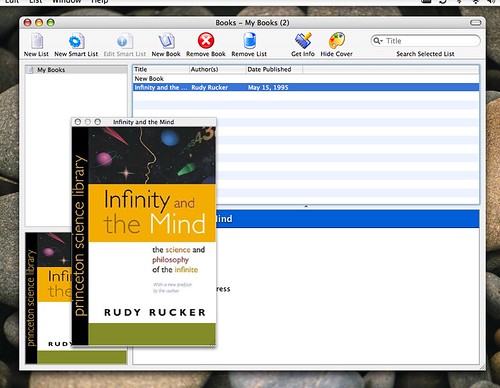
First off in the open-source bin we have Books which is book cataloging application to keep track of your library (requires OSX 10.4).

Secondly we have Cashbox a personal finance management application (requires OSX 10.4).

This one might prove a little tricky, i'm not sure but the instructions seem pretty straightforward and Home Media Librarian is a java application that uses MySQL database. It does what is says on the tin, catalogue your cd's, dvd's, records or music collection.

Now two freeware apps - eBook Library is an application developed to help you practice speed reading.

Luca is a fully featured and fully functional accounting application - snap it up, awesome freeware (requires OSX 10.4 Tiger)

Labels: , ,

AddThis Social Bookmark Button

Wednesday, 14 March 2007

IceClean

posted on Mac Beginners

Ok, 10.4.9 system update is out - if you didn't know check your "software update" now, as recommended on osxhints you should restart twice and do a permisions repair after the update and this should make all well. The first reboot may take a few minutes longer than usual, just thought i'd make you aware.

Now to the point of my post, now that you have updated to 10.4.9 your copy of MainMenu 1.7 wil not work and you will have to wait until 1.8 is released - "so, how do i repair my permissions then?" i hear you ask, well there is of course Disk Utility in the "Utilities" folder amongst your applications but - and here the main point of the post - i had seen stuff on this freeware application called IceClean.

IceClean is a system optimization and maintenance tool which utilises the built in unix system tasks to help keep your mac perky

Labels: , , ,

AddThis Social Bookmark Button

Friday, 2 March 2007

security on mac

posted on Mac Beginners

Security and peace of mind on a mac may be simpler and somewhat less of an issue than what you had when using a windows machine, especialy when it comes to the virus perspective. That said however, for any computer connected to the internet a firewall is something that you need to keep from intrusion onto your computer or indeed your network in a business environment. Now for the average home user turning on your inbuilt OSX firewall in system preferences should suffice - you will find firewall options under “Sharing” - or if you are someone like me who never trusted the inbuilt windows xp firefall to start with or in fact you need something a little more in your firewall software as you need it for a network then there are some software you can look into.

First off we have a freeware application called WaterRoof which is a frontend for the Mac OS X firewall and will help you configure extra options and monitors with setup wizards and an easy interface. Second up is the commercial software DoorStop X Firewall which again claims to add extension to the built in OSX firewall control, and on the main page you will find another piece of software a book and most interestingly a link to their blog on security which may be worth a look.

Now on the business/networking side of things is Intego NetBarrier with firewall, anti-vandal tools, privacy protection, data filter and monitoring tools you can secure your computer/network and keep a close eye on what’s going on.

Antivirus protection isn’t really neccessary we are told but in the light of recent shenanigans and possible future developments i can’t help but feel viruses are on the way to OSX, so just in case get your hands on a copy of ClamXav to make your online and network usage totally secure for your mac.

Labels: , , , ,

AddThis Social Bookmark Button

It's ME!

A Collection Of Thoughts On Anything From Apple Mac And Freeware To Fonts And Photography

Struggling IT Professional, Mac User and Photographer.

View Ian Marshall's profile on LinkedIn

Powered by Blogger

Add to Technorati Favorites

 Subscribe in a reader

web design directory web design directory

Spreadfirefox Affiliate Button

www.spreadthunderbird.com

www.flickr.com
This is a Flickr badge showing items in a set called Personal Bests. Make your own badge here.